
Notices
Shared bids now show only seniors’ bids, and pairings that are also in your bid are highlighted.
Browse: mark Days off and Pre-assigned days right on the calendar.
Links
Open Bid PeekIn any browser, phone or computer› iPhone appRequest a TestFlight invite›What it is
Before you build your PBS bid, see where the pilots senior to you are bidding. Put the pairings you want in your Layer 1, and Bid Peek shows when a senior is going for the same one — and suggests similar pairings that avoid the overlap.
Two ways to use it
iPhone app — follow steps 1 and 2 below.
Or in a browser — any phone or computer, nothing to install. Tap below to open Bid Peek with your invite link and join right away.
Copy your invite link first, then open the browser.
Open in browserYour bid is kept in that browser. Keep using the same browser (bookmark it), and write down your recovery code to sign in anywhere else — including the app.
1Get the iPhone app
Bid Peek is shared through TestFlight, Apple’s free app for trying apps before they are on the App Store.
- Send your Apple ID email and name below.
- When you are added, Apple emails you an invite from TestFlight.
- Install TestFlight from the App Store, open the email on your iPhone and tap View in TestFlight › Install.
2Join with your invite link
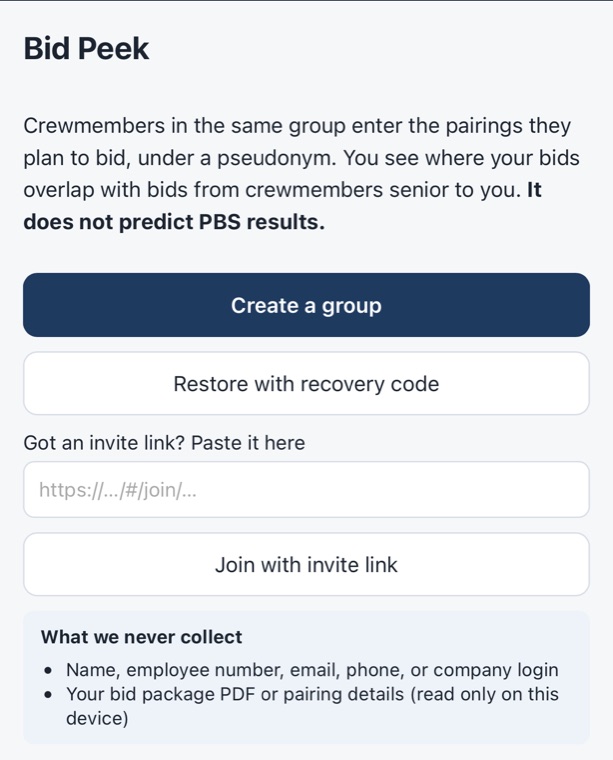
- Tap Copy invite link above.
- Open Bid Peek on your iPhone.
- Under Got an invite link? Paste it here, tap the box and paste.
- Tap Join with invite link.
- Enter your seniority number from this month’s bid package and choose line or reserve, tick I understand all of the above and tap Join. The bid package comes with the link (if it asks, pick the PDF — it is read on your phone only).
- Write down your recovery code — the only way back into your account on another device.
Tabs
Good to know
- It does not predict PBS results. Bids here are your plan — enter your real bid in PBS as usual.
- Stored on the server: only your seniority number and bids (deleted 30 days after bidding closes). Never your name, employee number, email, company login, the bid package or pairing details.
- Please share the invite link only with colleagues you trust.